Multi-Font Text Generation and Control
Two prompts demonstrating Nano Banana Pro's advanced text control capabilities, allowing the generation of a single string using multiple specified Japanese and English font styles, and even assigning different fonts to specific words within the string.

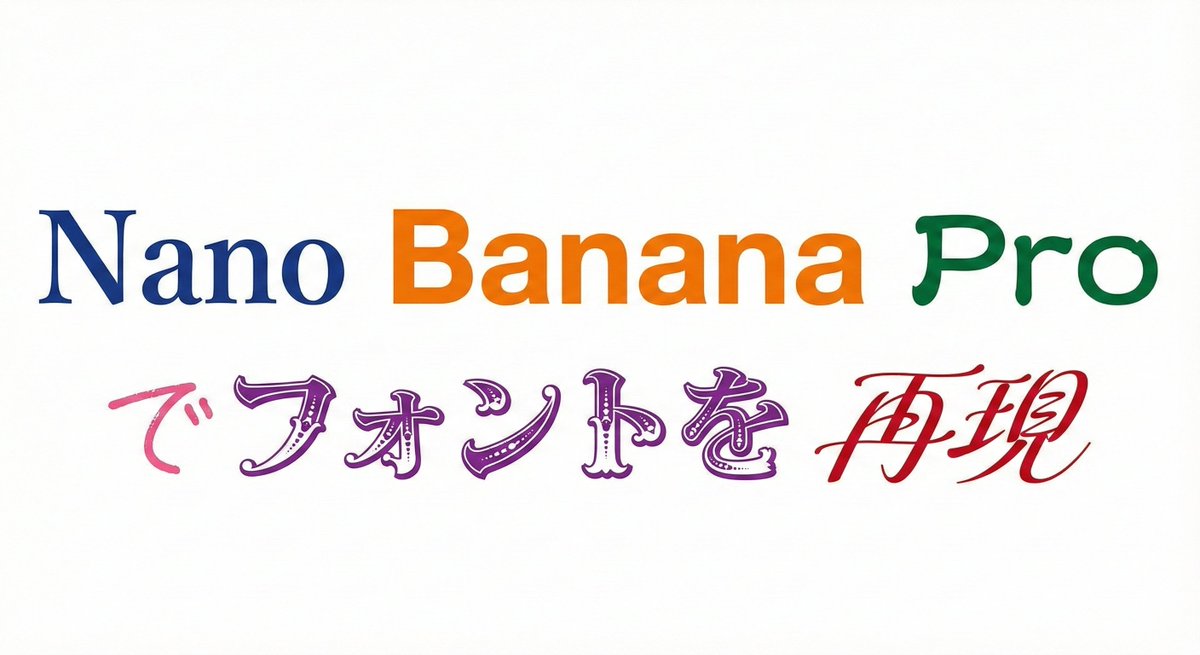
Prompt
以下の文字列を指定のフォントで表記してください
背景は白、文字は黒で表現して下さい。
9種のフォントを1回で生成してください。

# 文字列
{argument name="文字列1" default="Nano Banana Proでフォントを再現"}

# 再現したいフォント
明朝体(Serif)
ゴシック体(Sans-Serif)
隷書体(Reisho)
勘亭流(Kanteiryu)
手書き風(Handwritten)
デコラティブ/タイトル系(Display)
ホラー系(Horror)
サイバー・SF系(Tech)
カリグラフィ(Calligraphy / Script)

さらに文字列の特定の部分に特定のフォントを指定することもできる

プロンプト:
以下の文字列を指定のフォントで表記してください
背景は白、文字は各フォントで色を変更して下さい。

# 文字列
{argument name="文字列2" default="Nano Banana Proでフォントを再現"}

# 再現したいフォント
Nano :明朝体(Serif)
Banana :ゴシック体(Sans-Serif)
Pro:隷書体(Reisho)
で:手書き風(Handwritten)
フォントを:デコラティブ/タイトル系(Display)
再現:カリグラフィ(Calligraphy / Script)
Prompt source
License
CC BY 4.0. Prompt pages keep the original attribution and source links from the upstream gallery records stored in the database.
Related prompts

Wacky flowchart for toasting bread
A fun prompt to generate a wildly overcomplicated flowchart explaining how to toast bread, ideal for humorous instructional posters.
Ethan Mollick
Space shuttle diagram in space
Generates a diagram-style image of a space shuttle in outer space, useful for educational or illustrative content.
Nano Banana Pro
Product photo with item placed on a stone
A simple product photography prompt placing the subject neatly on top of a stone for clean, minimalistic 4K product shots.
Azer Koçulu

Bosch-inspired Harrowing of Hell follower scene
An art-history-inspired prompt to generate a scene in the style of a follower of Jheronimus Bosch depicting Christ in Limbo, the Harrowing of Hell.
@levelsio